Tuesday, August 5, 2008

KallOut Adds Search Option to Highlighed Text in Windows

KallOut is a very simple, yet very functional, Windows program. For highlighted text in many programs (including Firefox, Adobe Acrobat, Internet Explorer, Microsoft Office and Notepad) it puts a small icon next to the highlighted words, which looks like this . When you hover your mouse over that icon, it gives you a menu to look up the selected text in many popular services like Google, You Tube, Wikipedia, eBay and many more.

Also with the Best Guess feature, KallOut even analyzes the content you’ve selected and suggests the most relevant places to search for that phrase.

So, if you’ve selected an address, it will suggest Google Maps, Google Street View, and Microsoft Visual Earth. If you selected the name of a famous person, it will suggest their Wikipedia entry. This way, you don’t have to browse through the whole menu of services to find the one you want.

This floating window stays on top of the original window so you can continue working on your original task while referring to the results that KallOut returned. You can close the pop-up with the X button in the upper right corner, expand the results to a full browser window with the button to the left of the X, and minimize it to the top of the screen with the [-] button (by moving your mouse to the top of the screen, you can access all the KallOut searches you’ve done, or start a new one by clicking the blue KallOut button).

[Download]

Saturday, August 2, 2008

The 100 Most Oldest Domain Names in Internet

Anoop Engineer Says -

For your gyan, here is a list of first 100 owners of a ‘.com’ domain :


RankRegistered DateDomain Name
115-March-1985SYMBOLICS.COM
224-April-1985BBN.COM
324-May-1985THINK.COM
411-July-1985MCC.COM
530-September-1985DEC.COM
607-November-1985NORTHROP.COM
709-January-1986XEROX.COM
817-January-1986SRI.COM
903-March-1986HP.COM
1005-March-1986BELLCORE.COM
1119-March-1986IBM.COM
1119-March-1986SUN.COM
1325-March-1986INTEL.COM
1325-March-1986TI.COM
1525-April-1986ATT.COM
1608-May-1986GMR.COM
1608-May-1986TEK.COM
1810-July-1986FMC.COM
1810-July-1986UB.COM
2005-August-1986BELL-ATL.COM
2005-August-1986GE.COM
2005-August-1986GREBYN.COM
2005-August-1986ISC.COM
2005-August-1986NSC.COM
2005-August-1986STARGATE.COM
2602-September-1986BOEING.COM
2718-September-1986ITCORP.COM
2829-September-1986SIEMENS.COM
2918-October-1986PYRAMID.COM
3027-October-1986ALPHACDC.COM
3027-October-1986BDM.COM
3027-October-1986FLUKE.COM
3027-October-1986INMET.COM
3027-October-1986KESMAI.COM
3027-October-1986MENTOR.COM
3027-October-1986NEC.COM
3027-October-1986RAY.COM
3027-October-1986ROSEMOUNT.COM
3027-October-1986VORTEX.COM
4005-November-1986ALCOA.COM
4005-November-1986GTE.COM
4217-November-1986ADOBE.COM
4217-November-1986AMD.COM
4217-November-1986DAS.COM
4217-November-1986DATA-IO.COM
4217-November-1986OCTOPUS.COM
4217-November-1986PORTAL.COM
4217-November-1986TELTONE.COM
50
11-December-19863COM.COM
5011-December-1986AMDAHL.COM
5011-December-1986CCUR.COM
5011-December-1986CI.COM
5011-December-1986CONVERGENT.COM
5011-December-1986DG.COM
5011-December-1986PEREGRINE.COM
5011-December-1986QUAD.COM
5011-December-1986SQ.COM
5011-December-1986TANDY.COM
5011-December-1986TTI.COM
5011-December-1986UNISYS.COM
6119-January-1987CGI.COM
6119-January-1987CTS.COM
6119-January-1987SPDCC.COM
6419-February-1987APPLE.COM
6504-March-1987NMA.COM
6504-March-1987PRIME.COM
6704-April-1987PHILIPS.COM
6823-April-1987DATACUBE.COM
6823-April-1987KAI.COM
6823-April-1987TIC.COM
6823-April-1987VINE.COM
7230-April-1987NCR.COM
7314-May-1987CISCO.COM
7314-May-1987RDL.COM
7520-May-1987SLB.COM
7627-May-1987PARCPLACE.COM
7627-May-1987UTC.COM
7826-June-1987IDE.COM
7909-July-1987TRW.COM
8013-July-1987UNIPRESS.COM
8127-July-1987DUPONT.COM
8127-July-1987LOCKHEED.COM
8328-July-1987ROSETTA.COM
8418-August-1987TOAD.COM
8531-August-1987QUICK.COM
8603-September-1987ALLIED.COM
8603-September-1987DSC.COM
8603-September-1987SCO.COM
8922-September-1987GENE.COM
8922-September-1987KCCS.COM
8922-September-1987SPECTRA.COM
8922-September-1987WLK.COM
9330-September-1987MENTAT.COM
9414-October-1987WYSE.COM
9502-November-1987CFG.COM
9609-November-1987MARBLE.COM
9716-November-1987CAYMAN.COM
9716-November-1987ENTITY.COM
9924-November-1987KSR.COM
10030-November-1987NYNEXST.COM

Monday, July 28, 2008

Smart Desktop Organizes Your Info, Both Online and Off

Sarah Perez Says -

One of the software programs mentioned at this year's IORG conference (see our coverage here) was SmartDesktop. This program uses machine intelligence to automatically organize your information by project so you can quickly find what you need. In addition to organizing your emails and files created by desktop software, the beta version of this program also works with Google Docs and Zoho. These items appear in Smart Desktop as a "web resources," which allow you to quickly retrieve online documents without having to hunt through your browser bookmarks to find them.

About SmartDesktop

The SmartDesktop application is designed to be used by individuals who to assist with organization of emails and files by project. (A framework for developers is also available). The application only works on Windows machines and supports the following applications:

  • Microsoft Outlook 2003, 2007
  • Microsoft Word 2003, 2007
  • Microsoft Excel 2003, 2007
  • Microsoft PowerPoint 2003, 2007
  • Microsoft Visio 2003, 2007
  • Microsoft Project 2003, 2007
  • Internet Explorer v6, v7
  • Mozilla Firefox v1, v2, v3
  • Adobe Acrobat v6, v7, v8
  • Adobe Reader v7, v8
  • AutoDesk AutoCAD 2007, 2008
  • Compatible with Google Docs
  • Compatible with Zoho Sheets

While traditionally a software program like this would stick to only supporting other desktop software, the company seems to have taken note of the online office trend and has decided to branch out from being solely tied to the machine to support some cloud apps as well. With support for both Google Docs and Zoho (only Zoho Sheets, unfortunately), there's a chance for SmartDesktop to succeed among the online crowd as well. That is, assuming they continue to add support for online services, including the rest of Zoho's suite.

To really benefit from a program like SmartDesktop, you need to have a lot of data stored in files across both the web and your machine and no time or inclination to organize it on your own. But you don't need to work on "projects" to use SmartDesktop; it is meant to organize anything that you're working on, whether personal events, managing clients, doing research, planning a budget, etc. In SmartDesktop, a "project" is just the container for the files, email, and web pages that are related to each other.

This structure takes SmartDesktop beyond being just another desktop search app. Instead of just scanning your hard drive for keywords, it starts with a project-oriented view of your information and doesn't even index the information you haven't touched. This way, search results are faster and contain much less noise.

Will SmartDesktop really help pePublish Postople deal with information overload? Those interested in finding out can can sign up to be alerted when the beta is made available for download: just click here.

GMAIL joins Paypal and Ebay for Detecting Phishing Emails

Web Tools & Tips Says -

Phishing email scams are increasing day by day. New tricks are being learnt by the phishers and email providers are after them to be more clever in detecting phishing emails.

Related: You can find 9 effective ways to detecting phishing emails on this blog.

In a recent development, GMAIL, arguably the most secured email provider, has started cooperating with Paypal and Ebay, for better protection against phishing. Paypal and Ebay are notably the most targeted domains by phishing email attempts.

In the details posted on the Official Gmail Blog, Brad Taylor, Software Engineer and Gmail Spam Czar, has stated…

Now any email that claims to come from “paypal.com” or “ebay.com” (and their international versions) is authenticated by Gmail and — here comes the important part — rejected if it fails to verify as actually coming from PayPal or eBay. That’s right: you won’t even see the phishing message in your spam folder. Gmail just won’t accept it at all. Conversely, if you get an message in Gmail where the “From” says “@paypal.com” or “@ebay.com,” then you’ll know it actually came from PayPal or eBay. It’s email the way it should be.

Google is understood to be working on the well known concepts of Sender ID and DomainKeys for validating the sender, and this is one step further in the attempt to provide complete protection against all phishing attempts.

However, phishing attempts seems to be an the rampage these days with phishers and spammers working on newer ways to improve their success rates.

Full details here.

Tuesday, July 22, 2008

Fontspace Offers Free Social Font Downloads

Lee Mathews Says-

We love free fonts, but sometimes the process of finding half-decent ones can be pretty annoying. Fontspace.com tries to smooth out the rough spots for free font junkies.

Instead of simply categorizing fonts, Fontspace uses the good ol' tagging system - which provides easier access to similar fonts. The broad categories on some other sites (sorry DaFont) often lead to large, tiresome lists that require a boatload of time to sift through.

Registered users can also add fonts to their favorites ; this can be extremely useful in the event that someone - your husband , for example - accidentally forgets to back up your fonts before a reformat.

Switch Applications with DExposE2

Madhur Kapoor Says -

If you are looking for a cool app-switching application for Windows which is similar to Expose feature on Mac, then you won’t find one better than DExposE2. It doesn’t require a lot of RAM and gives you three options of switching between windows.

Its usage is very simple. The F9 key will let you minimize your applications to fit on the screen, then you can choose the one to bring to the front by hitting Tab or left-clicking your mouse. The F10 key highlights only the active windows belonging to the application currently running in the foreground and the F11 key reveals the desktop by shunting all active windows off to the right side of your screen, visible only as a thin and unidentifiable bar. Apart from this DExpose2has a lot of extra features like interactive previews, hot corners, multi-monitor support etc. It also lets you set up other hot keys or move your mouse to the corner of the screen to activate the windows. Other options include setting a background image, determining the behaviour of previously minimized windows, and customizing program labels.

It is only 600 Kb in size and doesn’t require a lot of RAM. So if you are looking for Expose emulator for Windows XP and Vista, this is the best.

Download

Top 10 Best Free Online AntiVirus Programs

Web Tools & Tips Says -

  1. Trend Micro HouseCall 6.6 Free Scan: HouseCall is a FREE Web-based tool designed to scan your PC for a wide range of Internet security threats including viruses, worms, Trojans, and spyware. It also detects system vulnerabilities and provides a link so you can easily download missing security patches. After each scan, HouseCall delivers a detailed report, which identifies security threats detected on your computer.
  2. Panda ActiveScan: Panda ActiveScan 2.0 detects all types of viruses, Trojans, worms, spyware, dialers, hacking tools, jokes, and other active or inactive (latent) security risks on your PC. It also detects vulnerabilities of software installed on your PC which could compromise your computer’s security. You can use Panda ActiveScan 2.0 whenever you want to make sure that your PC is free from all types of threats. Also, if you are registered or have bought the paid version you will be able to disinfect the threats that ActiveScan 2.0 finds on your PC.
  3. Computer Associates Virus Scanner: This scanner requires a browser such as Internet Explorer which is capable of rendering ActiveX objects.
  4. Symantec Security Check: Virus Detection checks for known threats, including top threats identified by Symantec Security Response. It provides an analysis of your results and offers suggestions for further action. It does not examine compressed files. In order to run Virus Detection you must be using Microsoft Internet Explorer 5.0 or higher with ActiveX and Scripting enabled.
  5. McAfee FreeScan: McAfee FreeScan helps you detect thousands of viruses on your computer. Based on the award-winning McAfee VirusScan engine, FreeScan searches for viruses, including the latest known "in the wild" viruses, and displays a detailed list of any infected files. Should viruses be found, FreeScan even provides links to more information about the viruses and what you can do to clean your system.
  6. BitDefender Free Online Virus Scan: BitDefender Online Scanner is an on-demand virus scanner which incorporates the award-winning BitDefender scanning engines. You can use it to scan your system’s memory, all files and drives’ boot sectors, and to automatically clean infected files. It is also ActiveX based. Requires Internet Explorer.
  7. ESET Online Scanner: A user-friendly, powerful tool, our online antivirus utility can remove malware—viruses, spyware, adware, worms, trojans, and more—from any PC utilizing only a web browser. No installation required. The scanner uses the same ThreatSense® technology and signatures as ESET NOD32 Antivirus, which means it is always up-to-date.
  8. Free Virus Scan - Kaspersky Lab: This free online virus scanner is a great way to find out if you have any viruses or spyware on your machine without having to uninstall your current antivirus software or install a new one. Most importantly, you can see what viruses your current antivirus software let slip through. It is stated that this free online virus scanner is very powerful and scans your machine very deeply, so it could take hours to complete. We suggest running it during a time of low activity.
  9. F-Secure Free Online Virus Scanner: F-Secure Online Virus Scanner (version 3.3) is a free service. Use it to find out if your computer is infected, and disinfect your computer if needed. The product will automatically download the necessary components and virus definition databases as it is started. The size of the download package is about 35 MB incl. databases
  10. Authentium :: Command-On-Demand - Free Virus Scanner: Authentium Command On Demand is a highly-effective, totally free virus scanner. Command on Demand scans for more than half a million Internet threats, using definition files that are updated daily.

Tuesday, July 8, 2008

How to Find the Location of any Server or IP Address

Nirmal Says
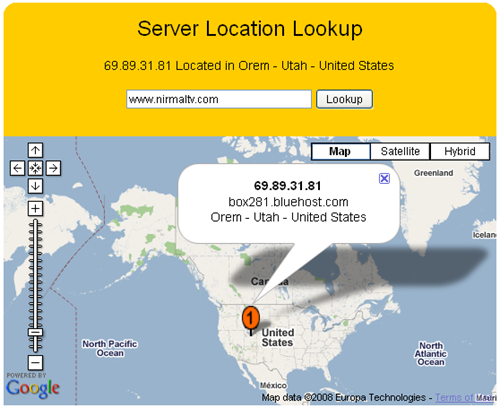
Whenever we sign up with any hosting services, we actually don’t know the physical location of our server. Here is a simple online tool to find out the physical location of any server based on URL or IP address. This service is provided by 81Solutions. All you need is to enter the URL or IP for your website. The server location is displayed on Google Maps.


Since the display is on Google maps, you can even zoom to find the exact location (the street) inside the country.

http://www.nirmaltv.com/wp-content/uploads/2008/07/image14.png

You can also use it to find the location of any IP address. This is a pretty useful tool for finding out server or IP addresses.

Server Lookup Page

Thursday, June 5, 2008

Top Wordpress Plugins for the Bloggers

TechnoBuzz says :

If you are a blogger, then you probably know about the power of the Wordpress platform. Straight out of the box, Wordpress is one of the best solutions for blogging.

Here is a great list that I whipped together of some of the most useful and most popular Wordpress plugins, if you dont yet have wordpress, or dont know what it is head over to wordpress.org, its a blogging software, which is awesome!
Enjoy the list.

Akismet: Akismet checks your comments against the Akismet web serivce to see if they look like spam or not. You need a WordPress.com API key to use this service. You can review the spam it catches under “Manage” and it automatically deletes old spam after 15 days. I highly recommend this plugin.

Google Sitemap Generator came in second. Looks like a lot of bloggers are starting to care about SEO and this plugin is the best tool to tell Google how it should crawl your blog and where to find everything you want found.

Show Top Commentators - If you are looking for a way to increase your comments and the interaction among your readership, this plugin is an excellent choice. Show Top Commentators encourages discussion by rewarding readers for making a comment. The top commentators are displayed in the sidebar with the number of comments they have made and a link back to their website.

Feedburner Feed Replacement - Forwards all feed traffic to Feedburner while creating a randomized feed for Feedburner to pull from.

Adsense Deluxe - If you run adsense on your blog, then this is the number one plugin to implement. Adsense Deluxe allows you to automatically insert Google Adsense with ease.

Related Posts - This plugin will find other blog posts that are related to the current post based on keyword matching. You can then display the related posts at the bottom of each article. This is an excellent way to keep visitors at your site for longer periods of time. Customize this plugin to display as many or as few related posts as you desire.

Wp-Contact form. This plugin developed by Ryan Duff is used by many bloggers. It creates a contact form on your blog, through which your readers can contact you. However at the moment of this writing, Ryans website seemed to be down. Another good plugin to generate contact forms is here. Update: You can download Spam protected Wp-contact form from Doug Carr blog here.

WP-Cache - An extremely efficient WordPress page caching system to make your site much faster and responsive. It works by caching Worpress pages and storing them in a static file for serving future requests.

Ultimate Tag Warrior - This is the best tag system for WordPress. Ultimate Tag Warrior will help you pick up more traffic from Technorati and adds a number of SEO benefits to your blog.

SEO Title Tag - Title tags are one of the most important on-page factors for search engine optimization. This plugin allows you to optimize your title tag for optimum traffic.

Wordpress Database Backup - Talk about a lifesaver. This plugin comes installed with Wordpress, providing an easy way to backup your Wordpress database. You can download the backup file or have it emailed to the address of your choice.

Popularity Contest A very useful plugin that lets you automatically highlight your best posts to your readers. It keeps a count of your post, category and archive views, comments, trackbacks, etc. and uses them to determine which of your posts are most popular. It can significantly increase the “stickiness” of your blog and help you convert first time visitors into a regular readers.

These are the list of most popular plugins in the blogosphere! If you liked it, help spread the news - do not forget to Digg it

10 best Free Online Virus and Malware Scanners

TechnoBuzz says :

1. BitDefender - An online version of the BitDefender software. Will scan your drives, files, and boot sector. Works only with Internet Explorer.

2. Computer Associates Malware Scanner - Browse your drives for a file you suspect of being malware and upload it for their scanner to check it for you.

3. ESET - Online malware scanner. With just an acceptance of ESET’s TOS, you can scan your PC for known malware including viruses, worms, Trojans,
phishing, and spyware.

4. NanoScan - NanoScan is an new and fast online virus scanner developed by Panda Software. It takes only 1-2 minutes to scan your whole PC. NanoScan is a free online solution that detects different kind of malware that could be running on the
computer.

5. McAfee FreeScan - McAfee FreeScan is a great virus scanner using the award-winning
McAfee Scan Engine. Uses ActiveX component

6. Avast - Online version of popular antivirus software Avast will scan individual files of up to 512kb in size.

7. TrendMicro - Scans for Viruses and Malware. It also scans for vulnerabilities and and fixes them to prevent re-infestation.

8. Jotti- Uses several scanners at once to scan files that you upload to detect malware that may be hidden.

9. Panda Security - Searches your system for worms, viruses, trojans and more after a small Active X download.

10. F-Secure - Simple virus scan from web. Uses ActiveX components

Top Online File Converters

Aibek Says:

zamzar is free and all-inclusive(video, music, images, documents) file conversion service. In 4 quick steps you can convert almost anything to anything else; (1)simply enter a file you want to convert by pointing to its location on your local drive or address on the web(ex; youtube video), (2)select output format(eg. PDF, doc, 3GP mobile, iPod, PSP…), (3) enter email address where it should send converted file and (4)convert it.

media-convert also lets you convert all types of files, i.e. video, music, images, docs and archives. It’s also free and supports almost all conceivable file formats. Procedure is pretty much the same; select file, specify output format and let it do the rest. Once it’s done with a file, it will provide you with a link from where it can be downloaded.

mux lets you convert youtube and googlevideo videos to following formats; mpeg-4, Quicktime, iPod(m4v), flash video, windows media, mpeg-1/2, windows avi, 3gb mobile and OGG Theora. It’s not as powerful as above mentioned zamzar or media-convert however it has some handy features that you won’t find with others(see below).

Special features
  • for more demanding users there is a power mux which allows users set additional settings on output file(bitrate, fps, file length…etc).
  • there is also a mux mobile which lets you convert web-videos to mobile format(3GP, AMR) and instantly forward them to any mobile for free.

Tuesday, June 3, 2008

How to enable thumbnail preview for Foxit Reader

TechSnack (Tech Blog) Says :
Foxit Reader is definitely best Adobe reader replacement. However, we are not able to enable the thumbnail preview in Windows Explorer if we set it as a default PDF viewer. This tip will help you to turn this feature on.

A lot of Foxit reader users request this feature, but unfortunately they haven’t implement it, even in the latest 2.3 version. I try to search through internet and i found a great article which can do this.

Steps :

  1. Install both Foxit reader and Adobe reader.
  2. Go to Start -> Run -> type regedit.
  3. In the Registry Editor, go to Edit -> Find. Type “foxit” in the field. Press Find Next a few times until you reach something like “FOXITR~1>EXE“.
  4. Browse to shell -> open -> command, copy the full path of your foxit reader.exe. For example, mine one is
    “C:\PROGRA~1\FOXITS~1\FOXITR~1\FOXITR~1.EXE” “%1″ <–A
  5. Find your full address for Adobe reader. Mine one is
    “C:\Program Files\Adobe\Reader 8.0\Reader\AcroRd32.exe” “%1″ <–B
    This value should be same with mine, unless you are using different version or install at different path.
  6. Search through all registry, replace path B with path A. Remember, only replace value that exactly the same with path B, else your Foxit reader/Acrobat reader may not work!

How to Backup Data in Windows XP and Vista?

Joel Thomas(Tech blogger) Says :
More than a blog, ones computer has much data which is more valuable than blog so its necessary to backup the data in the computer as well. I have listed the procedure to create backup in Windows XP and Vista here.

Backing up Data in Windows XP:
A backup wizard is provided with the Windows package which is very helpful to create a backup copy of your important documents.

Note: If you have Windows XP Professional, Backup utility is installed by default but in Windows XP Home it is not. However, Backup utility is provided with the CD.
Go to CD-ROM Drive:\VALUEADD\MSFT\NTBACKUP and double click Ntbackup.msi to start the Backup utility.

Follow this procedure to backup data using Backup utility:

Step 1: Click Start -> All Programs -> Accessories -> System Tools -> Backup.

Step 2: Click Next in the first page and choose ‘Back up Files and Settings’ in the second page.

Step 3: In the third page, you will be asked what to backup. If you have the habit of keeping all important files in your ‘My Documents’ folder and you want to backup only important files then choosing ‘My documents and settings’ would be more appropriate. Else if you want to manually choose the files and folders you want to backup, choose the option ‘Let me choose what to backup’.

Step 4: If you are manually choosing the folders, click all the folders you want to backup.

Step 5: On the next screen you will be asked to choose the backup type, Destination and Name. You won’t be using Tapes or Floppy Disks. You may select an external hard disk or another partition in the same hard disk. If the backup file size is small you may choose small portable pen drive such as USB hard drives.

Step 6: Windows XP does not support to write the backup file to a CD directly. So if you want to have the backup in a CD or DVD, create the backup file in the same hard disk and burn it in a CD or DVD.

If you have dedicated external hard disk for backup you can set a schedule to backup regularly. On the last page of backup utility before clicking Finish, Click Advanced -> When to Back up -> Later -> Set Schedule -> Schedule Job. Set the schedule and Click Ok.

Backing up Data in Windows Vista:
In Vista taking a backup is much easier than Windows XP. Vista allows taking backup in CD and DVD as well.

Follow this procedure to backup data using Backup utility:

Step 1: Go to Control Panel -> ‘Backup and Restore Centre’ and Choose Backup Files.

Step 2: Windows will search all possible places where you can take a backup copy and it will list it the next screen. If you want to take the backup in the network, you can browse and choose the destination for backup.

Step 3: Choose the drives you want to backup and choose the type of files you want to backup. System files, executable files won’t be backed up and backup can be done only from NTFS region.

Step 4: In the next screen choose how often you want to take backup and click ‘Save settings and start backup’.

How To Make Firefox Look Like Internet Explorer

Joel Thomas(Tech blogger) Says :

Are you a fan of Internet Explorer but you like the features of Firefox? Ok, then how about using Firefox which looks exactly like Internet Explorer?

John Haller helps you in changing Firefox to Internet Explorer in just 5 easy steps.

The Theme:
The first step is to change the theme of Firefox to look like Internet Explorer using the addon ‘Looks Familiar Theme’

The Icons:
Next to make all the icons that are in Firefox to look like Internet Explorer Icons, he provides a set of ‘Firefox Internet Explorer Icons Pack’

The Toolbar Layout:
Steps to customize the toolbar and its layout to look exactly the way it is in Internet Explorer with all the Bookmarks, History and Print button.

Window Title:
This little hack helps you to display the application as Internet Explorer instead of Firefox in the Window Title.

Miscellaneous Features:
By default there are some features which are available in IE but not in Firefox. Adding these miscellaneous features will make Firefox have all the exclusive features of IE.
Favorites Menu
Allow Copy/Paste
IE Tab
Adding Default Links

After this transformation it will really hard to find out whether you are using Firefox or Internet Explorer as it will change the entire look, features and even the title name. So enjoy all the features of Firefox still thinking that you are using Internet Explorer. :)

How to Change Default Download Location in Firefox 3?

Joel Thomas(Tech blogger) Says :

Firefox by default downloads all the files to the desktop. But a few like me love to keep their desktop clean and even few others are organized and love to download all their files to download folder or other folders in some personal drive.

So how to change the download location in Firefox 3?

Go to Tools -> Options.

Under Downloads section, click Browse to change the default download location.

But if you want to decide where to save the download each time, then choose the option ‘Always ask me where to save files’.

If you don’t want Firefox to remember what you have downloaded, go to Privacy tab in the options. Under the History section, uncheck Remember what I’ve downloaded.

If you want Firefox to clear the details of download each time you close the application, check Always clear my private data when I close Firefox under Private data. This will clear all the private details like browsing history, saver forms, search history etc. If you don’t want to delete your browsing history and others, click Settings under Private data and uncheck the features you don’t want to delete.

How to Set Yahoo Mail as the Default Mail Provider?

Joel Thomas(Tech blogger) Says :

If you are using Yahoo Mail as your primary Email provider then you might want to set Yahoo Mail as the default mail service so that when you click any email links, it opens Yahoo Mail and composes a new mail with that email address.

Yahoo has not provided this feature for a long time and yesterday when I was browsing, it gave a pop-up mentioning that I can setup Yahoo as the default mail.

So how to set Yahoo Mail as the default Email Provider?

Go the Inbox in Yahoo Mail and on the top right corner, click the Options.

Now, click the option, set Y! Mail as default webmail.

Note: The option is new and it is currently available only in Firefox and I believe Yahoo would make this option available in IE also soon.

Best of Tech Blogs: May 2008

Syahid A.(Tech Blogger) Says :

What I love about the Internet is that there will never be a shortage of excellent reading materials. Everyday, you can always learn something new. Here are some of the most interesting blog posts that I’ve read this month, grabbed from my circle of web friends. Check it out.

How to Shred Files In Your Hard Drive for Free? - KillerTechTips

How To Share Keyboard and Mouse On Multiple Computers - Raymond

How to make safari emulate (not really) as IE! - ReviewSaurus

Internet Explorer disabled or blocked at the office? Bypass restrictions - Online Tech Tips

Locate your stolen PC with Locate PC - TechnoBuzz

Hide your online status on yahoo from various services like buddy spy - Technix Update

How to retrieve lost bookmarks on Firefox - TechSnack

Create Beautiful Collages Out Of Your Photos - TechTracer

The easiest video downloader to use? - BlogAnything

Windows 7 More Screenshots - Sizlopedia

If You Don’t Backup Your Windows Password Now You’ll Hate Yourself Later - Information Addicts

All Run Commands In Vista

* Help Pane : helppane

* Color Management : colorcpl

* Computer Management Launcher : CompMgmtLauncher

* Control Panel : control

* Credential Backup and Restore Wizard : credwiz

* Defragment User Interface : dfrgui

* Driver Package Installer : dpinst

* DPI Scaling : dpiscaling

* DVD Player : dvdplay

* Display Adapter Troubleshooter : AdapterTroubleshooter

* Authorization Manager : azman.msc

* Bitlocker Wizard : bitlockerwizard

* Event Viewer : eventvwr

* Firewall Settings : FirewallSettings

* Firewall Control Panel : FirewallControlPanel

* Windows Firewall with Advanced Security : wf.msc

* Problem Reports and Solutions : wercon

* Windows Fax and Scan : wfs

* Windows Image Acquisition - wiaacmgr

* Windows Update Application Manager - wuapp

* Windows Standalong Update Manager - wusa

* Windows Shared Folder Management : fsmgmt.msc

* Snipping Tool : snippingtool

* Bitlocker Notifier : fvenotify

* Fax Cover Sheet Editor : fxscover

* iSCSI Initiator : iscsicpl

* Iexpress : iexpress

* Logoff from Vista : logoff

* Language Pack Installer : lpksetup

* Windows Mobility Center : mblctr

* Microsoft Sync Center : mobsync

* Microsoft Support Diagnostic Tool : msdt

* Remote Assistance : msra

* User Accounts : Netplwiz

* ODBC Data Source Administrator : odbcad32

* Optional Features Manager : optionalfeatures

* People Near Me : p2phost

* Performance Monitor : perfmon

* Presentation Settings : presentationsettings

* Printer Migration : PrintBrmUi

* Encryption File System : rekeywiz

* Windows Backup Utility : sdclt

* Accesibility Settings : sethc

* Windows Share Creation Wizard : shrpubw

* Software Licensing/Windows Activation : slui

* Sound Volume : sndvol

* Sound Recorder : soundrecorder

* Sticky Note : StikyNot

* Digitizer Calibration Tool : tabcal

* Trusted Platform Module : TpmInit

* System Properties : SystemPropertiesAdvanced

*System Properties (Hardware pre-selected) : SystemPropertiesHardware

* System Properties (Computer Name pre-selected) : SystemPropertiesComputerName

* System Properties (Performance pre-selected) : SystemPropertiesPerformance

* System Properties (Protection pre-selected) : SystemPropertiesProtection

*System Properties (Data Execution Prevention pre-selected) :

*SystemPropertiesDataExecutionPrevention

* System Properties (Remote pre-selected) : SystemPropertiesRemote

Switch Windows Quickly in Vista

Nirmal(Tech blogger) Says :

Switcher is a free application which can give more control over your open windows in Vista. Switcher allows you to See all your windows on one screen, quickly search through them, even decorate them with your favorite colors and fonts. Switcher runs in taskbar and will start whenever Windows starts. Once Switcher is running, press Windows+~ to begin switching between windows.


In case you have lots of windows open, you can search for windows. Start typing the text of the window you’re trying to find. A search box will automatically appear, and the windows will move and hide themselves until only the ones matching your text appear.

Switcher also allows you to select and adjust fonts, colors, sizes, and positions. You can also change the shortcut for switching windows.


Sunday, June 1, 2008

Gmail has added indian languages in it

Google has now added indian languages like اردو (Urdu) , मराठी (Marathi), हिन्दी (Hindi), বাংলা (Bangla), ગુજરાતી (Gujarati), ଓଡିଆ (Oriya), தமிழ் (Tamil), తెలుగు (Telugu), ಕನ್ನಡ (Kannada) and മലയാളം (Malayalam) in gmail. So friends enjoy gmail in your language.