Tuesday, July 22, 2008

Switch Applications with DExposE2

Madhur Kapoor Says -

If you are looking for a cool app-switching application for Windows which is similar to Expose feature on Mac, then you won’t find one better than DExposE2. It doesn’t require a lot of RAM and gives you three options of switching between windows.

Its usage is very simple. The F9 key will let you minimize your applications to fit on the screen, then you can choose the one to bring to the front by hitting Tab or left-clicking your mouse. The F10 key highlights only the active windows belonging to the application currently running in the foreground and the F11 key reveals the desktop by shunting all active windows off to the right side of your screen, visible only as a thin and unidentifiable bar. Apart from this DExpose2has a lot of extra features like interactive previews, hot corners, multi-monitor support etc. It also lets you set up other hot keys or move your mouse to the corner of the screen to activate the windows. Other options include setting a background image, determining the behaviour of previously minimized windows, and customizing program labels.

It is only 600 Kb in size and doesn’t require a lot of RAM. So if you are looking for Expose emulator for Windows XP and Vista, this is the best.

Download

Top 10 Best Free Online AntiVirus Programs

Web Tools & Tips Says -

  1. Trend Micro HouseCall 6.6 Free Scan: HouseCall is a FREE Web-based tool designed to scan your PC for a wide range of Internet security threats including viruses, worms, Trojans, and spyware. It also detects system vulnerabilities and provides a link so you can easily download missing security patches. After each scan, HouseCall delivers a detailed report, which identifies security threats detected on your computer.
  2. Panda ActiveScan: Panda ActiveScan 2.0 detects all types of viruses, Trojans, worms, spyware, dialers, hacking tools, jokes, and other active or inactive (latent) security risks on your PC. It also detects vulnerabilities of software installed on your PC which could compromise your computer’s security. You can use Panda ActiveScan 2.0 whenever you want to make sure that your PC is free from all types of threats. Also, if you are registered or have bought the paid version you will be able to disinfect the threats that ActiveScan 2.0 finds on your PC.
  3. Computer Associates Virus Scanner: This scanner requires a browser such as Internet Explorer which is capable of rendering ActiveX objects.
  4. Symantec Security Check: Virus Detection checks for known threats, including top threats identified by Symantec Security Response. It provides an analysis of your results and offers suggestions for further action. It does not examine compressed files. In order to run Virus Detection you must be using Microsoft Internet Explorer 5.0 or higher with ActiveX and Scripting enabled.
  5. McAfee FreeScan: McAfee FreeScan helps you detect thousands of viruses on your computer. Based on the award-winning McAfee VirusScan engine, FreeScan searches for viruses, including the latest known "in the wild" viruses, and displays a detailed list of any infected files. Should viruses be found, FreeScan even provides links to more information about the viruses and what you can do to clean your system.
  6. BitDefender Free Online Virus Scan: BitDefender Online Scanner is an on-demand virus scanner which incorporates the award-winning BitDefender scanning engines. You can use it to scan your system’s memory, all files and drives’ boot sectors, and to automatically clean infected files. It is also ActiveX based. Requires Internet Explorer.
  7. ESET Online Scanner: A user-friendly, powerful tool, our online antivirus utility can remove malware—viruses, spyware, adware, worms, trojans, and more—from any PC utilizing only a web browser. No installation required. The scanner uses the same ThreatSense® technology and signatures as ESET NOD32 Antivirus, which means it is always up-to-date.
  8. Free Virus Scan - Kaspersky Lab: This free online virus scanner is a great way to find out if you have any viruses or spyware on your machine without having to uninstall your current antivirus software or install a new one. Most importantly, you can see what viruses your current antivirus software let slip through. It is stated that this free online virus scanner is very powerful and scans your machine very deeply, so it could take hours to complete. We suggest running it during a time of low activity.
  9. F-Secure Free Online Virus Scanner: F-Secure Online Virus Scanner (version 3.3) is a free service. Use it to find out if your computer is infected, and disinfect your computer if needed. The product will automatically download the necessary components and virus definition databases as it is started. The size of the download package is about 35 MB incl. databases
  10. Authentium :: Command-On-Demand - Free Virus Scanner: Authentium Command On Demand is a highly-effective, totally free virus scanner. Command on Demand scans for more than half a million Internet threats, using definition files that are updated daily.

Tuesday, July 8, 2008

How to Find the Location of any Server or IP Address

Nirmal Says
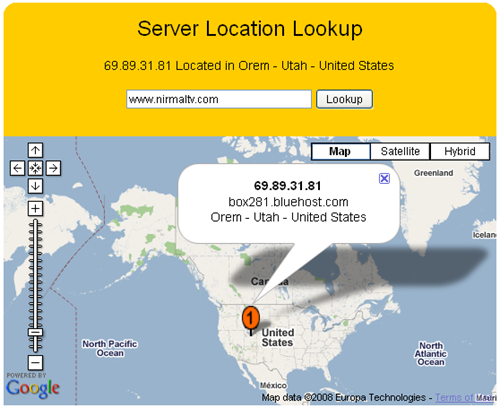
Whenever we sign up with any hosting services, we actually don’t know the physical location of our server. Here is a simple online tool to find out the physical location of any server based on URL or IP address. This service is provided by 81Solutions. All you need is to enter the URL or IP for your website. The server location is displayed on Google Maps.


Since the display is on Google maps, you can even zoom to find the exact location (the street) inside the country.

http://www.nirmaltv.com/wp-content/uploads/2008/07/image14.png

You can also use it to find the location of any IP address. This is a pretty useful tool for finding out server or IP addresses.

Server Lookup Page